Browse / Applications: Utilities
Desktop Enhancer
| Year | 1991 - 1992 |
|---|---|
| Publisher | Simplexity Software |
| Developers | ? |
| RAM Requirement | 1.25meg |
| System 6 Compatible | Yes |
| Hard Drive Installable | Yes |
| Release Status | Abandonware |
About
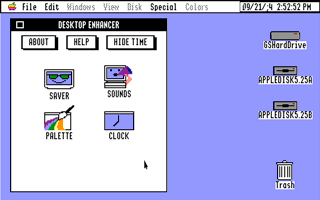
I vaguely remember Joe Kohn reviewing this utility ensemble (it must have been in an issue of InCider/A+ as I couldn't find it in Shareware Solutions II ) and pretty scathing it was too. Now that I've finally got my hands on this fairly obscure set of system enhancements for GS/OS, I can see why Joe had a bone to pick with this one. After installation, which is easy and intuitive, the Desktop Enhancer's features can be accessed through a single, easy to find new desk accessory from the Apple menu. But this is where the trouble starts. User interface wise, it truely is horrible. You'll first notice that, for some reason, all the text is written in uppercase, which is completely unnecessary. Any time an open dialogue is revealed, such as specifying a sound file to apply to a system event, again everything is written in uppercase and buttons are made smaller than regular dialogue boxes of this kind. Overall, there is no balance or alignment to the way anything is laid out in any of the panels or dialogues. It uses the older rectangular buttons with a drop shadow, instead of the rounded rectangles, that would normally also include a double stroked rounded rectangle hinting to the user that 'return' or 'enter' would do the same as clicking on such a button. You'll probably also close the window thinking it will take you back to the main menu too, but it merely closes the whole desk accessory - which makes sense when you think about it, but isn't intuitive.
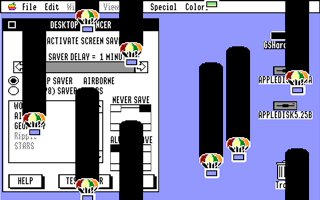
Anyways, going beyond the interface, the desktop pattern and picture module work fine (although you have to reboot to see the changes!), as does the sound module, and the screen saver as well, although I haven't stringently tested how they go with a variety of programs. The desktop clock works, but annoyingly it doesn't allow for different formats of date (in Australia and the UK, the day goes before the month - as it should be!). I like the invert option however. But it's all academic really, as it doesn't appear Y2K friendly (unlike the IIGS itself) as a semi colon appears where '1' should.
Overall there are shareware and freeware system extensions that do this better, and there's always Signature GS for most of the functionality included here and don't forget Twilight II for you screen saver needs.
Downloads
Screenshots